A Granola alternative that keeps the recording, on your PC.

Granola is the closest thing to Heiti, and it is very good. Neither one puts a bot in your call. Both record the audio of your own device.

The difference is what happens next. Granola sends the audio to cloud transcription and does not keep it. Heiti transcribes on your PC, keeps the recording so you can play back any moment, and learns each person's voice.

Free for Windows 10 and 11Transcribed on your PCRecording kept, with playback

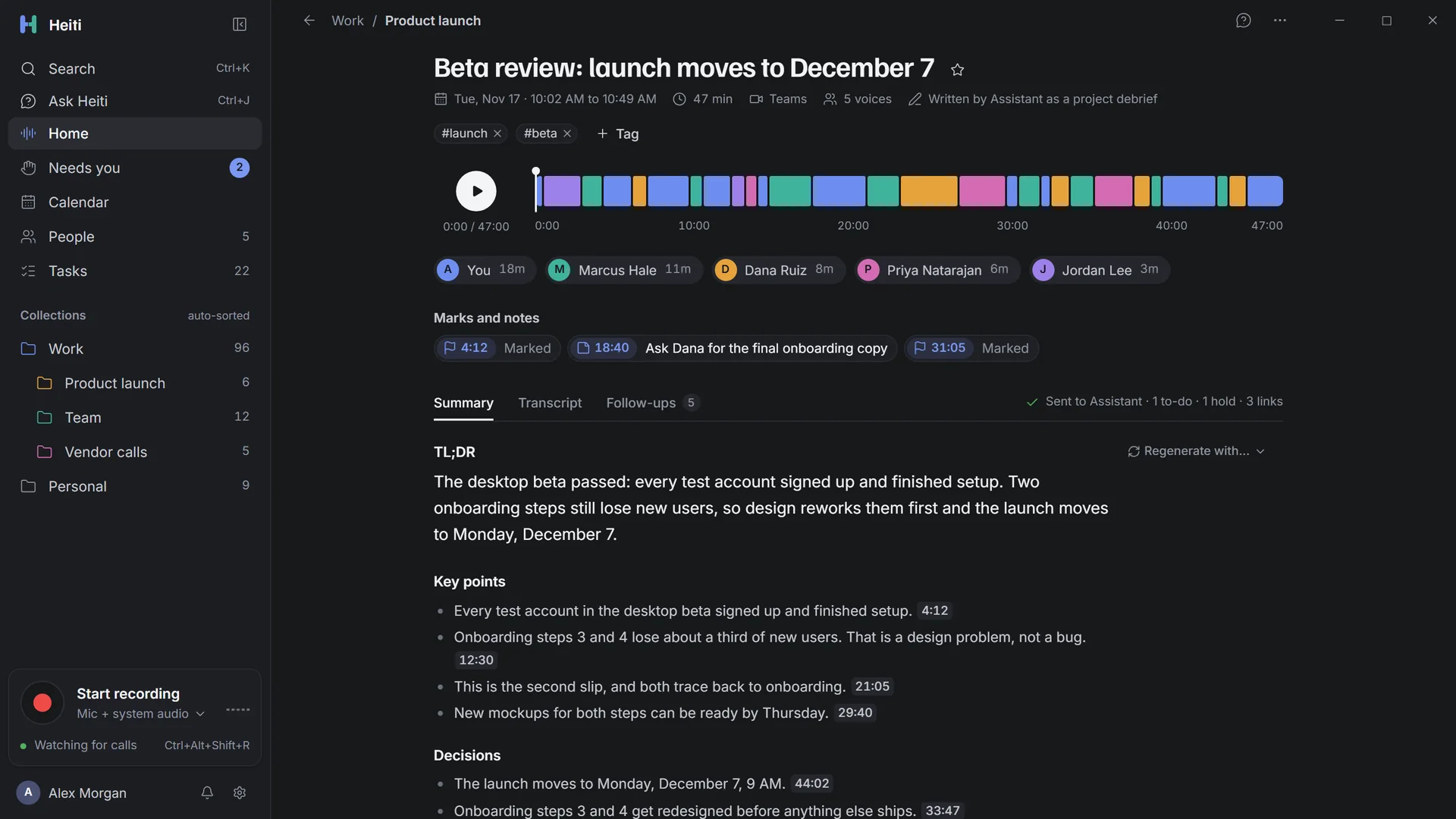
Heiti showing a recorded meeting: a coloured strip of who spoke when, the named voices with their talk time, and a written summary with key points and decisions.
The app's own screen, filled with made-up people.

Which one should you pick?

Pick Granola if

You are on a Mac, or you want your notes on your phone. Granola runs on Mac, Windows, iPhone and Android.

You like typing your own rough notes during the meeting and having AI tidy them up afterwards.

Cloud transcription is fine for your work and you do not need the audio afterwards.

Pick Heiti if

The audio has to stay on your computer, including during transcription.

You want to replay what was actually said. Heiti keeps the recording and links every line and every task to its moment.

You want real names on a shared room mic or an in-person talk. Heiti recognizes people by voice.

Side by side.

Heiti compared with Granola
What you care aboutHeitiGranola
PriceFree, or Pro at US$9.50 a month or US$96 a year, with 14 days free to start.Basic is free. Business is US$14 a user a month. Enterprise starts at US$35 a user a month.
Free plan limitsUnlimited local transcription, all your history, 5 AI summaries a month, one PC.No meeting cap. Notes older than 30 days are hidden until you upgrade.
A bot in the callNever. It records your own mic and the audio your PC plays.Granola also has no bot. It captures audio directly from your device.
Where audio is transcribedOn your PC.In the cloud, in real time, by transcription providers Granola names in its documentation.
The recording afterwardsKept on your PC. Play back any moment from the transcript.Audio is not kept, so there is nothing to play back. Notes are stored on Granola's servers in the United States.
Knowing who spokeBy voice. Name a voice once and it is recognized in later meetings, online or in the room. Voiceprints stay encrypted on your PC.Me and Them by default. Speaker tags can name people from their display name on Meet, Zoom and Teams.
In-person conversationsYes, from your PC's microphone.The mobile app labels people Speaker A, B. Voices on one shared device cannot be told apart.
Where it runsWindows 10 and 11 only. Mac is built on request.Mac, Windows, iPhone and Android.
Who writes the notesThe AI you choose: your own agent, your API key or a local model.Granola's built-in AI, working from your own typed notes and the transcript.
AI trainingYour audio and transcripts never reach us, so there is nothing for us to train on.On Basic and Business, Granola says it trains on anonymized data unless you opt out. It is off by default on Enterprise.
Agents and APIA local MCP server inside the app. Free reads, Pro also writes. No network port.A hosted MCP server on all plans, with transcript tools on paid plans. API keys on Business and Enterprise.

Granola details were read from the vendor's own pages on 24 November 2026: pricing, security, transcription, speaker attribution, billing, model training, MCP. Heiti details are for version 0.5.2. Both products change. If something here is out of date, tell us and we will fix it.

Where the audio goes after it is captured.

Granola and Heiti agree on the important thing: a notetaker should not be a guest in your meeting. Both listen from your own device.

Granola then streams that audio to the cloud to transcribe it and throws the audio away. That keeps the app light and lets it run on a phone. It also means the conversation leaves your machine, and you cannot go back and listen.

Heiti transcribes on your PC and keeps the recording next to the transcript. It costs you some disk space and a first-time model download of about 600 MB. In return nothing is uploaded, and when a line in the notes looks wrong you can go to that moment in the recording and listen.

How each one names the speakers.

Granola's default is two speakers: you, and everyone else. On supported desktop calls it can tag speakers from their display names.

Heiti separates every voice and remembers the ones you name. That is the difference in a room with one microphone, on a call where three people share a conference line, or with anyone who joined as a phone number.

What Heiti costs.

Free

Available now

$0

Free for good, on one PC

  • Record by hand and import
  • Unlimited local transcription
  • Speaker separation, with up to 5 people remembered
  • Dictation on a hotkey
  • 5 AI summaries a month, on your key or a local model
  • Read-only MCP for your agent
Download free for Windows

Pro

Available now

$9.50/month

14 days free, then billed monthly. Or US$96 a year, which is US$8 a month.

  • Everything in Free, plus
  • Call detection, auto-record and always-on
  • Unlimited voice memory and auto-naming
  • Unlimited summaries, templates and Ask Heiti
  • Tasks and follow-ups, agent hand-off and write MCP
  • Markdown brain folder and encrypted sync across PCs
Start 14 day free trial

Transcription is unlimited on both plans because it runs on your own PC. Summaries are written by the AI you connect, so there is no AI bill from us. Pro starts with 14 days free: a card is needed to start, nothing is charged until the trial ends, and cancelling before then costs nothing. Cancel Pro any time from your account. Refunds ยท Terms.

Before you ask.

Is Heiti a free alternative to Granola?

Both have a free plan. Heiti Free includes unlimited local transcription and all of your history on one PC, with 5 AI summaries a month. Granola's free Basic plan has no meeting cap and hides notes older than 30 days until you upgrade.

Does Granola work on Windows?

Yes. Granola lists Windows 10 and later alongside Mac, iPhone and Android. Heiti is Windows only today.

Does Granola keep the audio?

Granola says it does not keep audio on desktop, so there is no recording to play back. Heiti keeps the recording on your PC, and you can delete it whenever you like.

Does my audio leave my PC with Heiti?

No. Recording, transcription and voice recognition all run on your computer. The only meeting content that can leave is text you choose to send to an AI provider for a summary.

Who writes Heiti's summaries?

The AI you choose: the agent you already use, such as Claude Code or Codex, your own Anthropic or OpenAI key, or a model running on your PC. Free includes 5 summaries a month and Pro has no limit. Heiti does not bundle its own cloud AI, which is why your meeting text never passes through us.

Is there a Mac version of Heiti?

Not yet. Heiti is a Windows app today. The Mac version is built on request: ask for Heiti for Mac and we will email you when it is ready.

Recording laws differ by place, and some require everyone's consent. Heiti makes it easy to tell people you are recording; telling them is up to you.

More comparisons.

The meeting ends.
Heiti remembers.

Free for Windows 10 and 11. Install it and press record.