A Plaud alternative with no device to buy and no minutes to count.

Plaud makes a clever pocket recorder, and nothing beats it when you are away from your desk. The transcripts and summaries come from Plaud's cloud, on a plan measured in minutes.

Heiti uses the PC you already have. It records calls and in-person conversations, transcribes them on your computer and never counts a minute.

Free for Windows 10 and 11No device to buyNo minute limits

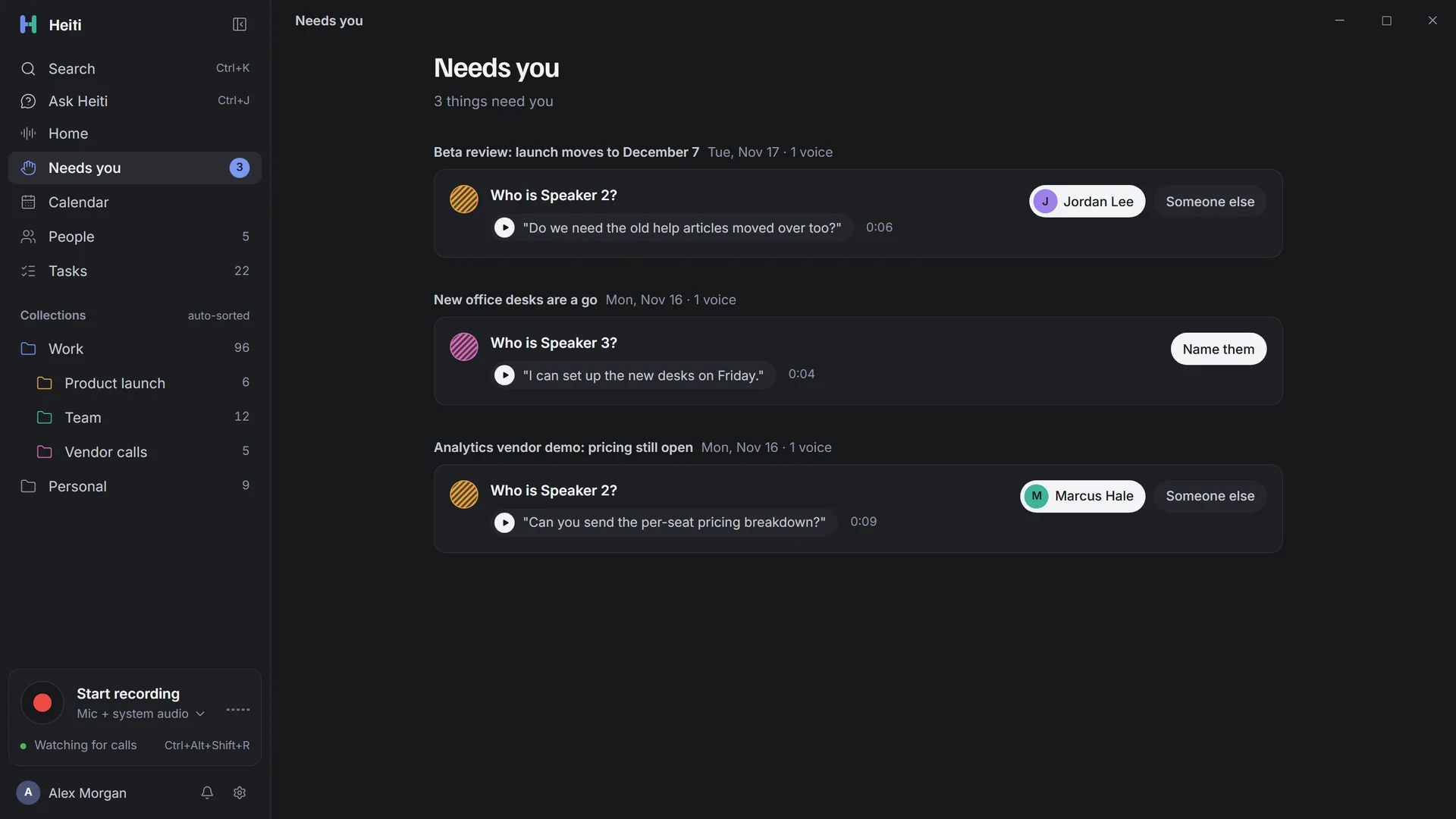
Heiti asking who Speaker 2 is, with a short clip to play, its best guess and a button for someone else.
Name a voice once and Heiti knows that person in every later meeting. The app's own screen, with made-up people.

Which one should you pick?

Pick Plaud if

Most of what you record happens away from a computer: site visits, hallway talks, phone calls, lectures.

You want a dedicated device you can clip on or carry, and you are fine with a cloud plan for the AI.

You need your recordings on your phone.

Pick Heiti if

Your meetings happen at your PC, on Teams, Zoom or Meet, or with your laptop on the table.

You are tired of watching a minutes allowance. Local transcription has no meter.

You want people named automatically across meetings, and not relabeled by hand in each recording.

Side by side.

Heiti compared with Plaud
What you care aboutHeitiPlaud
What you buyNothing. It runs on the Windows PC you already have.A Plaud recorder. The Note Pro lists at US$189, and sale prices vary.
Plan priceFree, or Pro at US$9.50 a month or US$96 a year, with 14 days free to start.Starter comes with a device. Pro is US$17.99 a month, or US$8.33 a month billed annually. Unlimited is US$29.99, or US$20 billed annually.
Transcription minutesUnlimited on Free and Pro. It runs on your own PC, so there is no meter.Starter: 300 minutes a month. Pro: 1,200 minutes a month. Unlimited is capped at 24 hours a day.
Where audio is processedOn your PC. Recordings and transcripts are stored there, not on our servers.In Plaud's cloud. Its trust page says data is transferred to the cloud for processing.
Recording computer callsYes. Your mic and the call's audio, on separate tracks, with no bot.Plaud Desktop, labelled Beta, records computer meetings with no bot. Without a device it needs a paid plan.
Knowing who spokeBy voice. Name a voice once and it is recognized in later meetings, online or in the room. Voiceprints stay encrypted on your PC.Speaker 1, 2. You name them in each recording. Only your own voice is recognized across recordings.
Away from your deskNo. Heiti needs your PC.Yes. That is what the recorder is for.
Who writes the notesThe AI you choose: your own agent, your API key or a local model.Plaud's cloud AI, using models from providers it names.
AI trainingYour audio and transcripts never reach us, so there is nothing for us to train on.Plaud says it does not train on your data unless you opt in.
Agents and APIA local MCP server inside the app. Free reads, Pro also writes. No network port.An MCP server in preview, read-only. No public API.

Plaud details were read from the vendor's own pages on 24 November 2026: AI plan pricing, Note Pro, Plaud Desktop, trust center, speaker labels, voice profile, MCP. Heiti details are for version 0.5.2. Both products change. If something here is out of date, tell us and we will fix it.

Which one fits where you meet.

Plaud is hardware first. The device captures the audio anywhere, then the phone app sends it to the cloud for the transcript and the summary. If your day is on your feet, that is the right shape.

Heiti is for the meetings that happen where your computer already is. There is nothing to charge, nothing to sync, and no plan that runs out in the third week of the month. It was built by someone who had a recorder subscription and wanted the meetings to stay at home.

Some people will want both: a recorder for the road, and Heiti for everything at the desk. Heiti imports transcripts, with their audio when you have it, so the two can share one memory.

What Heiti costs.

Free

Available now

$0

Free for good, on one PC

  • Record by hand and import
  • Unlimited local transcription
  • Speaker separation, with up to 5 people remembered
  • Dictation on a hotkey
  • 5 AI summaries a month, on your key or a local model
  • Read-only MCP for your agent
Download free for Windows

Pro

Available now

$9.50/month

14 days free, then billed monthly. Or US$96 a year, which is US$8 a month.

  • Everything in Free, plus
  • Call detection, auto-record and always-on
  • Unlimited voice memory and auto-naming
  • Unlimited summaries, templates and Ask Heiti
  • Tasks and follow-ups, agent hand-off and write MCP
  • Markdown brain folder and encrypted sync across PCs
Start 14 day free trial

Transcription is unlimited on both plans because it runs on your own PC. Summaries are written by the AI you connect, so there is no AI bill from us. Pro starts with 14 days free: a card is needed to start, nothing is charged until the trial ends, and cancelling before then costs nothing. Cancel Pro any time from your account. Refunds ยท Terms.

Before you ask.

Is there a Plaud alternative without a subscription?

Heiti Free costs nothing and has no minute limit, because transcription runs on your own PC. It needs a Windows computer and does not replace a pocket recorder away from your desk.

Can I bring my Plaud recordings into Heiti?

Yes, for the transcript. Export it from Plaud in a format Heiti reads (TXT, SRT, VTT, DOCX, JSON or Markdown), with the audio when you have it, and import it. Import is in Free and Pro.

Does Heiti work for in-person meetings?

Yes, from your PC's microphone. Put the laptop on the table and press record. People you have named before are recognized by voice.

Does my audio leave my PC with Heiti?

No. Recording, transcription and voice recognition all run on your computer. The only meeting content that can leave is text you choose to send to an AI provider for a summary.

Who writes Heiti's summaries?

The AI you choose: the agent you already use, such as Claude Code or Codex, your own Anthropic or OpenAI key, or a model running on your PC. Free includes 5 summaries a month and Pro has no limit. Heiti does not bundle its own cloud AI, which is why your meeting text never passes through us.

Is there a Mac version of Heiti?

Not yet. Heiti is a Windows app today. The Mac version is built on request: ask for Heiti for Mac and we will email you when it is ready.

Recording laws differ by place, and some require everyone's consent. Heiti makes it easy to tell people you are recording; telling them is up to you.

More comparisons.

The meeting ends.
Heiti remembers.

Free for Windows 10 and 11. Install it and press record.