An Otter alternative that never uploads the audio.

Otter is a good cloud notetaker, and it runs on almost everything. It transcribes on its servers and counts your minutes.

Heiti does the same job on your own Windows PC. The audio stays there, nothing joins the call, and transcription has no meter.

Free for Windows 10 and 11No bot joins your callTranscribed on your PC

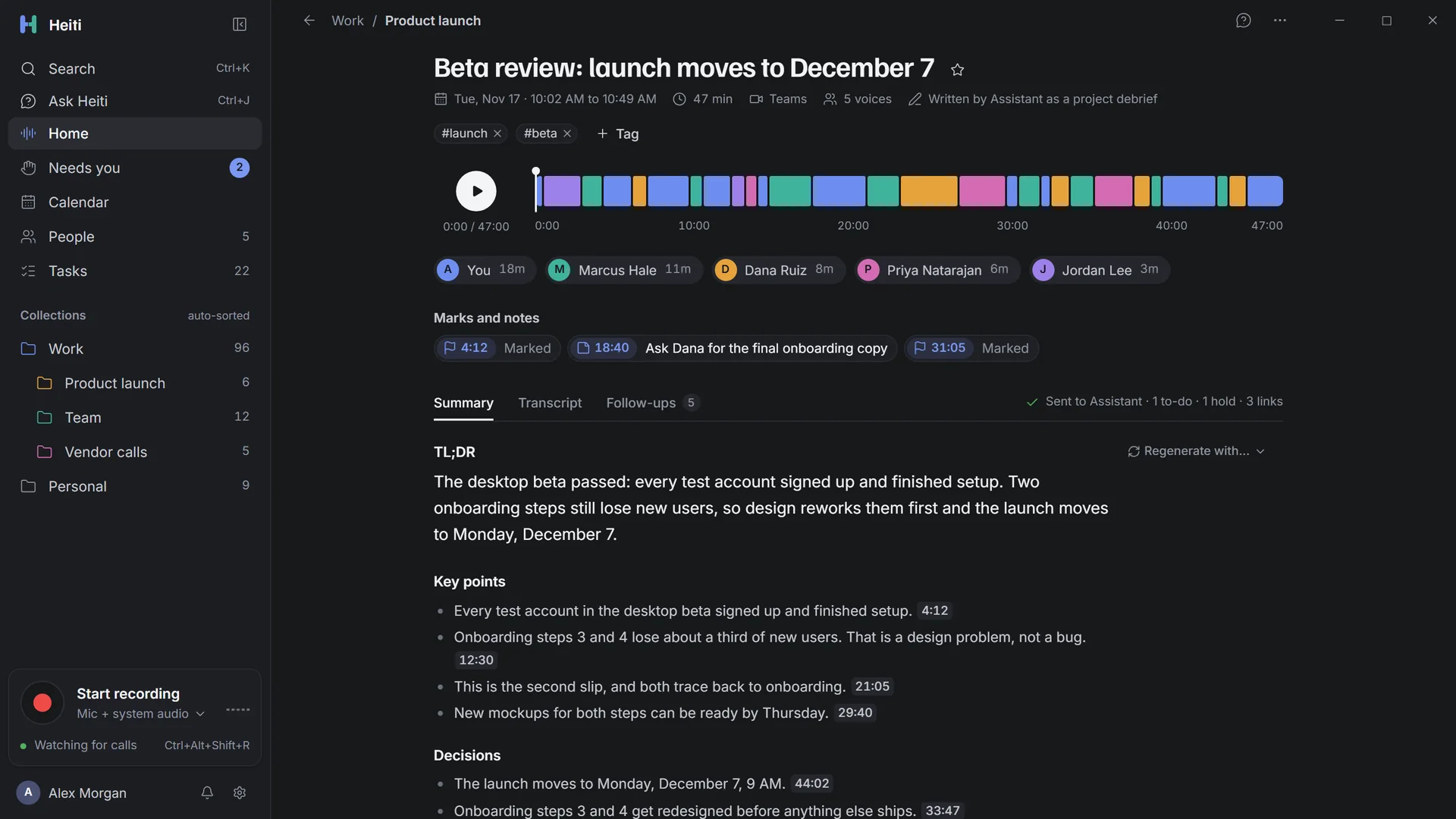
Heiti showing a recorded meeting: a coloured strip of who spoke when, the named voices with their talk time, and a written summary with key points and decisions.
The app's own screen, filled with made-up people.

Which one should you pick?

Pick Otter if

You want your notes on a phone, a Mac or the web. Otter runs on all of them and Heiti is Windows only.

You want notes written and shared with your team without setting anything up. Otter's AI is built in.

A cloud service holding your recordings is fine for the work you do.

Pick Heiti if

Your audio cannot leave your computer, or you would simply rather it did not.

You are in more meetings than a minute allowance covers. Local transcription is unlimited, even on Free.

You already use Claude Code, Codex or a local model and want that to write the notes and answer questions about your meetings.

Side by side.

Heiti compared with Otter
What you care aboutHeitiOtter
PriceFree, or Pro at US$9.50 a month or US$96 a year, with 14 days free to start.Basic is free. Pro is US$16.99 a user a month, or US$8.33 a month billed annually. Business is US$30, or US$19.99 billed annually.
Transcription minutesUnlimited on Free and Pro. It runs on your own PC, so there is no meter.Basic: 300 minutes a month, 30 minutes per conversation. Pro: 1,200 minutes a month, 90 minutes per conversation.
A bot in the callNever. It records your own mic and the audio your PC plays.Otter Notetaker joins Zoom, Teams and Meet as a participant. The Otter desktop app can also record without it joining.
Where audio is processedOn your PC. Recordings and transcripts are stored there, not on our servers.In Otter's cloud. Audio recorded offline is uploaded afterwards to make the transcript.
Without internetRecording and transcription work offline once the speech models have downloaded.You can record offline. The transcript is made after the audio uploads.
Knowing who spokeBy voice. Name a voice once and it is recognized in later meetings, online or in the room. Voiceprints stay encrypted on your PC.Tag a speaker and Otter learns that voice for later conversations. Untagged speakers show as Speaker 1, 2 and so on.
In-person conversationsYes, from your PC's microphone.Yes, in a browser or the mobile app.
Where it runsWindows 10 and 11 only. Mac is built on request.Windows, Mac, web, iPhone and Android.
Who writes the notesThe AI you choose: your own agent, your API key or a local model.Otter's built-in AI.
AI trainingYour audio and transcripts never reach us, so there is nothing for us to train on.Otter says it de-identifies user data before training its own models, and that its outside AI providers do not train on it.
Agents and APIA local MCP server inside the app. Free reads, Pro also writes. No network port.Otter offers an MCP server. Its public API is for Enterprise workspaces.

Otter details were read from the vendor's own pages on 24 November 2026: pricing, Basic plan limits, desktop app, offline recording, speaker identification, privacy and security. Heiti details are for version 0.5.2. Both products change. If something here is out of date, tell us and we will fix it.

The real difference is where the work happens.

Otter and Heiti both give you a transcript with names on it and a summary. Otter does the work on its servers, which is why it runs on any device and why it meters minutes: every minute costs Otter compute.

Heiti does the work on your PC, on your graphics card when you have one. That is why the audio never leaves, why there is no minute limit, and also why it needs a reasonably recent Windows computer.

If the cloud is fine for you, Otter is less to set up. If it is not, that is the whole reason Heiti exists.

What Heiti costs.

Free

Available now

$0

Free for good, on one PC

  • Record by hand and import
  • Unlimited local transcription
  • Speaker separation, with up to 5 people remembered
  • Dictation on a hotkey
  • 5 AI summaries a month, on your key or a local model
  • Read-only MCP for your agent
Download free for Windows

Pro

Available now

$9.50/month

14 days free, then billed monthly. Or US$96 a year, which is US$8 a month.

  • Everything in Free, plus
  • Call detection, auto-record and always-on
  • Unlimited voice memory and auto-naming
  • Unlimited summaries, templates and Ask Heiti
  • Tasks and follow-ups, agent hand-off and write MCP
  • Markdown brain folder and encrypted sync across PCs
Start 14 day free trial

Transcription is unlimited on both plans because it runs on your own PC. Summaries are written by the AI you connect, so there is no AI bill from us. Pro starts with 14 days free: a card is needed to start, nothing is charged until the trial ends, and cancelling before then costs nothing. Cancel Pro any time from your account. Refunds ยท Terms.

Before you ask.

Is Heiti a free alternative to Otter?

Heiti Free costs nothing and includes unlimited local transcription, speaker separation, dictation and 5 AI summaries a month. Otter's free Basic plan includes 300 minutes a month with a 30 minute limit per conversation.

Does Otter need a bot in the meeting?

Not always. Otter Notetaker joins Zoom, Teams and Meet as a participant, and Otter's desktop app can record without the notetaker joining. Either way the audio is transcribed in Otter's cloud. Heiti never joins and transcribes on your PC.

Can I move my Otter transcripts into Heiti?

Yes. Export them from Otter in a format Heiti reads (TXT, SRT, VTT, DOCX, JSON or Markdown) and import them, with the audio when you have it. Import is in Free and Pro.

Does my audio leave my PC with Heiti?

No. Recording, transcription and voice recognition all run on your computer. The only meeting content that can leave is text you choose to send to an AI provider for a summary.

Who writes Heiti's summaries?

The AI you choose: the agent you already use, such as Claude Code or Codex, your own Anthropic or OpenAI key, or a model running on your PC. Free includes 5 summaries a month and Pro has no limit. Heiti does not bundle its own cloud AI, which is why your meeting text never passes through us.

Is there a Mac version of Heiti?

Not yet. Heiti is a Windows app today. The Mac version is built on request: ask for Heiti for Mac and we will email you when it is ready.

Recording laws differ by place, and some require everyone's consent. Heiti makes it easy to tell people you are recording; telling them is up to you.

More comparisons.

The meeting ends.
Heiti remembers.

Free for Windows 10 and 11. Install it and press record.